Local Weather: Weather Radar
- 3.8
- Rating
- 100.00K
- Installs
- Free
- Price
 Analysis by App-foxy
When I need a quick weather check before leaving home, I want something more useful than a vague temperature number. I want to know whether the next part of my day looks manageable, especially when a short shower could change a walk, commute, or outdoor plan. Local Weather: Weather Radar, from Viscept Mobile, is built around that simple need. It is a free weather app for Android, aimed at giving local conditions a more direct place in my routine.
My overall impression is that it works best as a focused first stop rather than as a complete replacement for every weather tool. The app’s store summary presents it as a weather assistant that understands the user, while its short description keeps things simple with “Local Weather.” In practice, that positioning makes sense: I would open it to orient myself around current local conditions and nearby weather movement, not to turn it into a full planning system for a long trip or a specialist forecasting workstation.
From a vague weather question to a practical decision
The starting condition is familiar. I am about to leave, I have laundry outside, or I am deciding whether to cycle instead of drive. A normal weather app can answer “what is the temperature?” but that is only one part of the decision. What matters is how the local situation affects the next handoff: from the phone screen to my clothing choice, route, timing, or backup plan.
You May Also Like

 Blood Strike: 2.5 Anniversary
Blood Strike’s Loadouts Turn Every Drop Into a Tactical Gamble
A close look at Blood Strike’s custom loadouts: how fast access to signature weapons reshapes its battle royale rhythm, rewards preparation, and narrows the gap between fights.

 Pandora - Music & Podcasts
Pandora’s Music Is Easy to Start, but Harder to Recover
Pandora’s strength is its low-effort path from a seed to a station. Its weak spot is how much confidence it asks you to place in connection, setup, and quiet recovery.

 8 Ball Pool
 Is Built on Rivalries, Rematches, and Routine
A close look at the rivalries, rematches, shared routines, and unanswered safety questions that turn a quick pool match into a persistent mobile community.

 Samsung Music
’s Quiet Strength Is Playing What You Already Own
Its reach comes less from spectacle than from dependable access to a personal library. That simplicity is both the app’s strongest retention engine and its ceiling.

 AccuWeather: Weather Radar
AccuWeather Review: A Quick, Clear Forecast for Everyday Decisions
For everyday plans, the best forecast is the one you can understand quickly. AccuWeather makes rain timing, radar, and local conditions easy to act on, with a few trade-offs.

 Hill Climb Racing
Why Hill Climb Racing Still Turns Crashes Into One More Run
A tiny car, a bumpy hill and one more upgrade: Hill Climb Racing keeps resurfacing because its simple chaos makes every near-miss feel personal.
More From Our News Desk
View All News


That is where the radar-oriented identity matters. A radar view encourages me to think in terms of movement and proximity instead of treating weather as a static label. I can begin with the local area, look at what is happening around it, and then decide whether the forecast deserves a second look before I commit to an activity. The useful habit is to use the radar as a decision aid, not as a promise that every minute of weather will be predicted perfectly.
For a short everyday check, the workflow feels naturally compact. I open the app, look for the local picture, interpret what is approaching or passing, and then connect that information to a real action. If the screen suggests unsettled conditions, I might take a jacket or delay a short errand. If the picture looks quiet, I can stop checking instead of repeatedly refreshing several unrelated sources.
What I would do before relying on it
I would first make sure the displayed location is the place that actually matters. “Local” can mean home, work, a school, or a destination, and those places may have noticeably different conditions during a passing shower. This is an important practical distinction: a radar view centered on the wrong place can look convincing while leading to the wrong decision.
I would also decide what level of certainty I need. For a walk across town, a quick local view may be enough. For a day at the beach, a hike, a sporting event, or a drive through changing terrain, I would treat this app as one input and compare it with a more detailed forecast source. That is not a criticism unique to this app; it is the sensible boundary for any compact weather assistant.
The app is free, which removes the most obvious barrier to trying it. It is rated for Everyone, so it is suitable for a broad household audience rather than being aimed at a specialist group. The current version is 1.0.2 and requires Android 10 or later, a detail worth checking before installing it on an older phone. I would not assume that an older device can run it simply because the task itself is lightweight.
Reading the local view without overthinking it
My preferred approach would be to read the display in layers. First, I would establish the immediate condition around the selected area. Next, I would look outward for the broader pattern. Finally, I would ask whether that pattern changes my plan within the time I care about. This prevents a common mistake: staring at a colorful weather map without translating it into a decision.
A useful example is a morning commute. I might check the app while preparing breakfast, notice that the local area is currently calm, and then inspect whether a band of weather is moving toward the route. That leads to a practical handoff: I either leave as planned, carry rain protection, or choose another form of transport. The app does not need to make the decision for me. Its value is reducing the effort required to make a better-informed one.
Another example is outdoor laundry. A general daily forecast may say there is a chance of rain, which is technically helpful but not very actionable. A local radar view gives me a reason to think about timing: is the risk close enough to matter before the clothes dry, or is the weather activity elsewhere? I would still use judgment, but the visual context can be more useful than a single percentage.
Where the information changes hands
The most important handoff is between the app and my own interpretation. Weather information is not the final product; the final product is a choice. I need to convert a local display into “leave now,” “wait,” “bring protection,” or “check again later.” That makes the app easy to use for people who want a quick visual cue, but less satisfying for users who expect a detailed explanation of every forecast factor.
The next handoff is from a general local check to a more specific source when the consequences are higher. If I am planning a long drive, I would want route-level information and a broader forecast. If I am scheduling an outdoor event, I would want more than a snapshot of nearby conditions. In those cases, Local Weather: Weather Radar can still be the first screen I open, but I would not make it the only screen.
This distinction also helps explain its place among usual alternatives. A basic phone weather widget is faster for a glance at temperature and a simple forecast. A large, feature-heavy weather service may provide more layers, longer planning horizons, alerts, and specialist detail. A radar-focused app sits between those choices: more visual and situational than a minimal widget, but potentially less comprehensive than an established all-purpose weather platform.
That middle position is useful for people who find large weather apps cluttered. I would rather open a focused tool when my question is simply “what is happening near me right now?” The trade-off is that users who want extensive customization, highly detailed historical information, or a single dashboard for many locations may prefer a broader alternative.
Three practical habits that improve the experience
My first tip is to check the app at the moment a decision becomes time-sensitive, rather than treating an early-morning glance as permanent truth. Weather changes, and a radar view is most valuable when it is connected to the next action. Checking before leaving, before starting a run, or before setting up outside is more useful than checking once and forgetting the result.
Second, I would compare the center of attention with the surrounding area. A local condition can look fine while nearby weather is moving toward it. The surrounding pattern is often what determines whether “fine now” will remain fine long enough for the plan. This is a more thoughtful workflow than looking only at the current icon or temperature.
Third, I would use the app to decide when not to keep checking. If the local picture is stable and my activity is short, I can make a choice and move on. Constantly switching between weather apps can create the illusion of precision without improving the decision. The focused nature of this app is helpful here because it encourages a quick check-and-act routine.
A fourth useful habit is to separate urgency from curiosity. If I am simply interested in the weather, I can explore the local view casually. If I am about to make a costly or inconvenient choice, I should slow down and verify the wider situation elsewhere. This keeps the app in its strongest role and avoids asking a compact local tool to answer questions it was not designed to settle on its own.
What the result looks like in daily use
The result I want is not a perfect forecast; it is fewer avoidable surprises. If I carry a light layer because the nearby pattern looks unsettled, the app has done its job even if the rain never reaches me. If I postpone washing the car because local conditions look unstable, I have used the information sensibly. The outcome is practical rather than dramatic: better timing and less needless checking.
For families, the app could be useful as a shared quick-reference tool. One person can check the local conditions before school or work, then pass the conclusion to everyone else: take an umbrella, leave a little earlier, or expect a dry trip. Because the content rating is Everyone, it does not present itself as an adult-only utility, and its subject is straightforward enough for ordinary household use.
For someone who works outdoors, the value depends on the task. A short local job may benefit from a fast radar check before tools are unloaded. A full-day construction, farming, or event schedule needs more robust planning and should not depend on one compact app. I would use this app to support a go/no-go moment, then consult a wider forecast for staffing, equipment, and timing decisions.
Travelers should think similarly. Near a hotel, the app may help answer whether it is sensible to walk to a nearby restaurant right now. It is less suitable as the sole source for a multi-hour excursion across several regions. The closer the activity is to the selected local area and the shorter the time window, the more naturally the app fits.
Where the workflow breaks down
The first point of friction is interpretation. A radar display can be more informative than a single weather icon, but it also asks the user to understand what the visual pattern means. Someone who wants a plain-language answer may find a simple forecast card easier. The app is therefore strongest for users willing to spend a moment reading the local picture, not for people who want every conclusion reduced to one sentence.
The second limitation is scope. A local view is not the same as a complete forecast for a journey, an entire day, or a complex event. If my plan crosses several areas, I need to repeat the check for each meaningful location or move to a service designed around routes and extended planning. That extra handoff can reduce the convenience that attracted me to the app in the first place.
The third issue is confidence. A visual display can make weather feel more exact than it really is. I would avoid interpreting a narrow boundary as a guaranteed arrival time or assuming that a clear-looking area means conditions will remain comfortable. Local geography and fast-changing weather can complicate the picture. The app is helpful when it informs judgment, but risky when it replaces judgment.
There is also the practical question of device compatibility. Since the app needs Android 10 or newer, anyone using an older phone should check that requirement before planning around it. That is a small detail, but it can become a major interruption if the app is discovered only when someone is already preparing for a trip or outdoor activity.
The public response so far is modest but useful as context: the app has a 3.9 average from around 138 ratings, with roughly 14 written reviews and over 50 thousand installs. Those figures suggest that it has attracted a real early audience, while also reminding me not to treat it as a universally proven replacement for long-established weather services. I would judge it by my own workflow and by whether its local view answers my particular question quickly.
Who should install it, and who should look elsewhere
I would recommend giving it a try if you want a free, local weather tool with a radar-centered way of thinking. It makes sense for quick decisions about walking, commuting, errands, laundry, and short outdoor plans. It is especially appealing if conventional weather apps feel overloaded and you prefer to begin with what is happening near your current area.
I would be more cautious if you need detailed long-range planning, multiple-location management, route-specific forecasting, or highly specialized weather information. In those situations, a broader weather service is likely to be a better primary tool. The app can still serve as a quick local cross-check, but it should not carry the entire planning burden.
I would also skip it if my ideal weather experience is completely passive. Some users want a widget, a notification, and a plain-language daily summary without interpreting a map or local visual context. For them, a simpler phone-integrated option may be more comfortable. The right choice depends less on whether radar sounds impressive and more on whether I actually want to look at local weather movement before acting.
My final take after following the full workflow
Local Weather: Weather Radar earns its place as a focused first check for nearby conditions. I like the way it turns a vague question into a sequence: identify the relevant place, inspect the local situation, look at the surrounding pattern, and connect that view to a real choice. That workflow is more useful than simply collecting weather numbers without knowing what to do with them.
At the same time, I would keep its boundaries in mind. It is not the app I would trust alone for a long journey, a major outdoor event, or a decision where changing conditions carry serious consequences. Its best outcome comes from pairing a quick local check with sensible judgment and, when needed, a more comprehensive alternative.
For a free Android weather app developed by Viscept Mobile, the current release offers a straightforward reason to exist: helping me understand the immediate weather situation before I step into it. If that is the question I ask most often, I would install it and build the check into my routine. If I need a complete forecasting command center, I would choose something broader and keep this one as a convenient local companion.
FAQs for Local Weather: Weather Radar
01What features does Local Weather: Weather Radar offer?
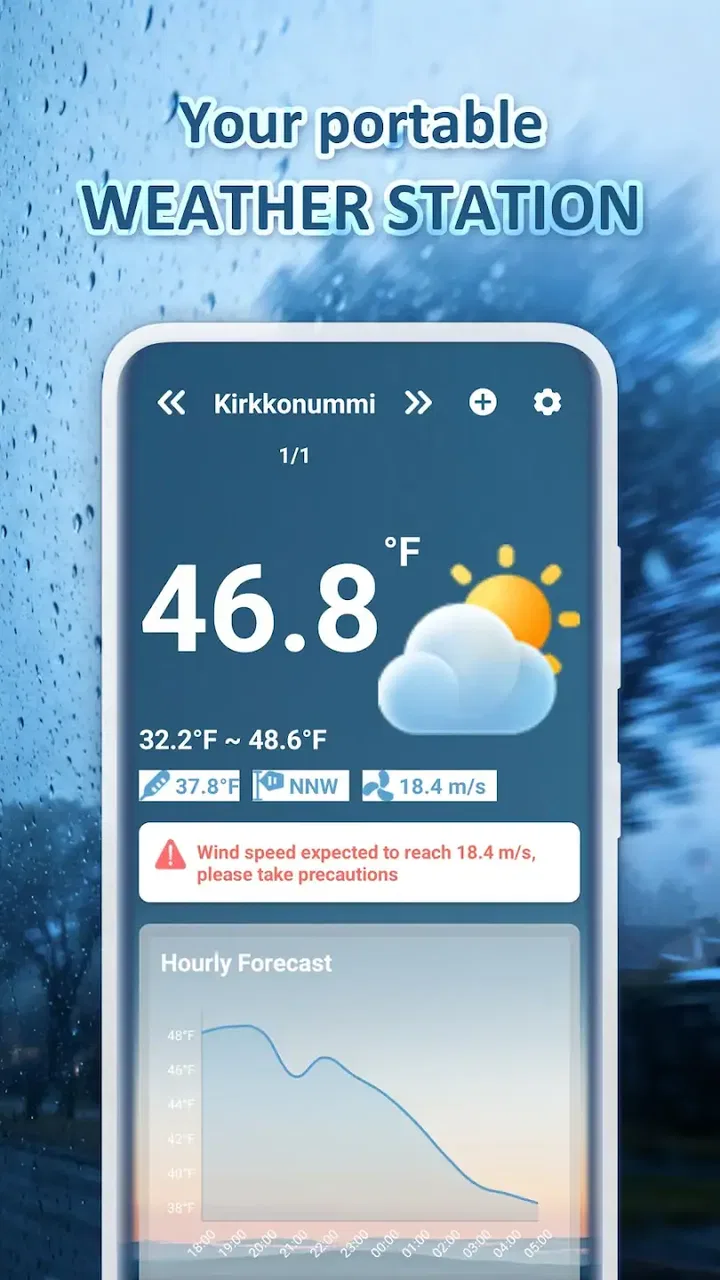
Local Weather: Weather Radar provides real-time weather updates, detailed forecasts, and interactive radar maps. Users can access hourly, daily, and weekly forecasts, along with severe weather alerts. The app also includes features like sunrise/sunset times, humidity levels, and wind forecasts, making it a comprehensive tool for planning your day.
02Is Local Weather: Weather Radar free to use?
Local Weather: Weather Radar is available as a free download, offering basic features at no cost. However, there may be in-app purchases or subscription options for users who wish to access premium features, such as ad-free experience or advanced weather data. Be sure to check the app store listing for specific pricing details.
03How accurate is the weather data in Local Weather: Weather Radar?
The app utilizes data from multiple reliable meteorological sources to provide accurate weather information. While no weather app can guarantee 100% accuracy, Local Weather: Weather Radar is designed to offer the most up-to-date and precise forecasts available, making it a trusted option for weather updates.
04Can I customize the notifications in Local Weather: Weather Radar?
Yes, Local Weather: Weather Radar allows users to customize notifications to suit their preferences. You can set alerts for severe weather conditions, daily forecasts, or specific weather changes. This feature ensures you receive timely updates tailored to your needs, helping you stay prepared for any weather situation.
05Does Local Weather: Weather Radar support multiple locations?
The app supports multiple locations, allowing users to monitor weather conditions in different areas. This is particularly useful for travelers or those with family in various locations. You can easily add and switch between locations to get the latest weather updates wherever you are or plan to be.
Pros
- Accurate real-time weather updates.
- Intuitive and user-friendly interface.
- Customizable alerts for severe weather.
- Detailed radar and satellite imagery.
- Minimal data usage for quick loading.
Cons
- Ads can be intrusive at times.
- Limited widget customization options.
- Some features require premium access.
- Occasional lag in smaller regions.
- Lacks integration with smart devices.

Local Weather: Weather Radar
Gallery